ARP ‘n’ MIDI Multitool
USB MIDI Host, Hub, Looper, Router & Expressive Controller
Finally all your usb midi stuff can talk through this smart router thing without a computer.
Effortless live arps and time-locked loops by waving your hand.
- Global arpeggio and beat repeat combo
- Touch and distance expression controllers
- Change loop length in real-time to record a longer loop over a repeating shorter one.
- Auto glissando makes samplers sound like analog synth
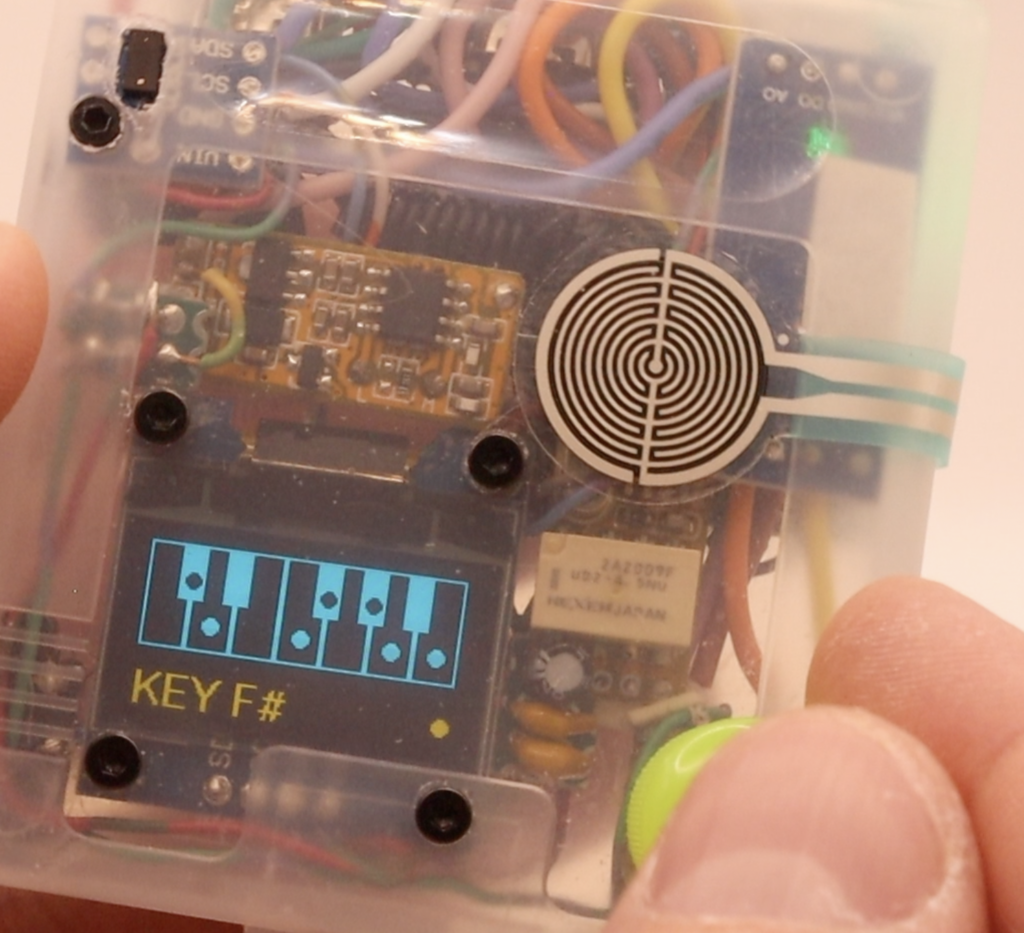
- Force-in-key & screens to show fretboard notes to play along
- Round-Robin mode gives polyphony to mono instruments
- Channel routing and CC control
Plus it boots nearly instantly!
ARPnMIDI
🔗 GitHub Link
Open Source RP2040 Zero MIDI router / arpeggiator / looper / expression / key finder / multitool / and more! By Joseph Wozniak
with SSD1306 OLED display (2-color recommended, yellow on the bottom)
Connect multiple usb midi devices with a hub. Output din/trs or usb midi.
Control live parameters and the appegiator with:
- Optical distance sensor (VL53L0X)
- Push force pressure sensor (FSR402 sensor with LM393 module)
- Assignable CC controls
- 4 foot pedal inputs (optionally connected to a QIACHIP RX480E wireless module)
You can also add an additional RP2040 board as a usb midi device, for full usb-to-usb rounting to another usb host. Use this file for the secondary RP2040: rp2040_usb_din_midi_bridge.txt
Current Hardware Pin Map (RP2040 Zero board labels)
Use the pin numbers exactly as printed on the RP2040 Zero board:
0DIN MIDI OUT (TX to DIN/TRS out + Pro Micro RX pin)1DIN MIDI IN (RX from DIN/TRS with optocoupler or Pro Micro TX pin WITH RESISTORS. 10k from tx to rx pins, 20k from tx to gnd)2I2C SDA (SSD1306 + VL53L0X on same bus)3I2C SCL (SSD1306 + VL53L0X on same bus)6Rotary encoder A7Rotary encoder B8Rotary encoder push switch9, 10, 12, 13 Foot pedal 1-4 input (active high, uses pull-down)14USB host D+15USB host D-26Push/pressure analog sensor input (FSR402 sensor with LM393 module)
Pin 11 is intentionally unused, so we can put a screw there.
RP2040 / Arduino-Pico USB Host optional resistors for best performance:
USB MIDI host D+ to 22ohm resistor to GPIO pin 14USB MIDI host D- to 22ohm resistor to GPIO pin 15The 22ohm resistors go near the RP2040.USB MIDI host port requires 5V VBUS power, and two 15k resistorsOne from D+ to ground, and another from D- to ground.Use a ground wire to the usb host thicker than 30awg.Twist D+ and D-, try to keep them short.
Build Notes
BOARD SETUP
IMPORTANT set CPU Speed: "240 MHz (Overclock)"
- Board:
Waveshare RP2040 Zero - USB stack:
Adafruit TinyUSB - CPU:
240 MHzONLY - midi USB host uses PIO-USB on pins
14/15. Adafruit_NeoPixelmust stay disabled in this sketch while USB host is enabled (ARPNMIDI_ENABLE_RGB_LED 0), because it conflicts with PIO-USB state machines.Pico-PIO-USBis vendored invendor/Pico-PIO-USB(tag0.7.1) and must be available to Arduino.- TinyUSB host MIDI support in the installed Arduino-Pico core must define:
#define CFG_TUH_MIDI (CFG_TUH_DEVICE_MAX)(ignore this if it’s confusing)
Commercial Version Coming 2026 (More Info Here)
Join the email waitlist for the first chance at the first batch! I won’t spam you.
1. `BPM`
– Range: `20..300`.
– Sets arp tempo directly.
– Top screen: large BPM number.
2. `ARP MODE`
– Options:
– `OFF`
– `UP`
– `DOWN`
– `UP-DOWN 1`
– `UP-DOWN 2`
– `TRIGGER`
– `RANDOM`
– `UP 1-OCT`
– `RHYTHM`
– `OSTINATO`
– `OCT WALK`
– `FIFTH`
– `BASS+CHORD`
– `CHORD+RUN`
– Top screen: mode symbol for classic modes, pattern preview for pattern modes.
3. `DIVISION`
– Options: `1/1`, `1/2`, `1/2T`, `1/4`, `1/4T`, `1/8`, `1/8T`, `1/16`, `1/16T`, `1/32`, `1/32T`, `1/64`.
– Changing this gives you different trap high-hat rolls, among other tricks.
– Top screen: pie visualization + division text.
4. `VELOCITY`
– Range: `1..127`.
– Applies to arp note output velocity.
– `VEL DOWN` sensor/push mode can reduce this live while in range.
– Top screen: bar + numeric value.
5. `LENGTH`
– Range: `1..100` percent of step duration.
– Applies to arp gate length.
– `LEN DOWN` sensor/push mode can reduce this live while in range.
– Top screen: bar + percent.
6. `INPUT CH`
– Options: `CH 1..CH 16`.
– Main processing input channel for arp/thru/bass and mapped CC/PB/program routing.
7. `ARP CH`
– Options:
– `OFF`
– `CH 1..CH 16`
– `1+10`
– `1+10-A`
– `1-10 24`
– `1-10 36`
– `1-10 48`
– `1+10`: main arp on ch1 path plus drum-chord arp lane on ch10.
– `1+10-A`: same as `1+10`, plus ch10 channel aftertouch controls new ch10 drum-lane arp pulse velocity (33% minimum, `42..127`).
– `1-10 24/36/48`: same as `1+10`, plus 8-note split from input channel to ch10 drum lane:
– `1-10 24`: input notes `24..31` remap to ch10 `36..43`
– `1-10 36`: input notes `36..43` remap to ch10 `36..43`
– `1-10 48`: input notes `48..55` remap to ch10 `36..43`
– Drum lane velocity is forced to max (`127`) for `1+10` and `1-10 24/36/48`.
– The ch10 drum lane still pulses like an arp lane even when `ARP MODE` is `OFF`.
8. `BASS CH`
– Options: `OFF`, then channel groups for `CH1..CH12`.
– Per channel, octave offsets are: `-2`, `-1`, `0`, `+1` oct.
– Behavior: lowest-note-priority mono bass voice.
– If bass channel equals arp channel, bass output is suppressed.
9. `THRU OUT`
– Options: `OFF`, `CH 1..CH 16`.
– Thru path for notes from input channel.
– If thru channel equals bass channel while bass is enabled, thru is suppressed for that channel.
10. `RNDRBN` (Multiple monophonic synths can be used polyphonically, or use each channel for unexpected note timbres)
– Checkbox list for output channels `CH 1..CH 16`, `[ ]CH10-1+`, `[ ]CH10-2+`, plus `CLEAR` and `BACK`.
– Click a channel while editing to toggle its checkmark.
– Checked channels are used as the round-robin rotation for the arp output channel path.
– `[ ]CH10-1+` maps final routed ch10 notes 36..51 into full-velocity note 60 on channels 1..16 after ch10 arp routing is complete.
– `[ ]CH10-2+` maps final routed ch10 notes 36..49 into channels 2..15 (note 12 on CH2, note 48 on CH3, note 60 on others).
– In select mode, the top screen shows the checked channel list in small text.
– If no channels are checked, round-robin is off.
– Checking either `CH10-1+` or `CH10-2+` unchecks the other.
11. `ROUTER`
– List entries are formatted like `16>16+12` or `01>02=00`.
– Select an input channel row, choose its output channel, then choose note transpose in semitones.
– Transpose affects note and poly-aftertouch note numbers; other channel messages only change channel.
– `CLEAR` restores every channel to its default `CH n > CH n =00` mapping.
– When all mappings are default, the runtime router is bypassed with only a single active-mask check.
12. `DIV NOTE` (notes give you drum rolls, and other magic)
– Cursor options:
– Division slots: `1/4`, `1/4T`, `1/8`, `1/8T`, `1/16`, `1/16T`, `1/32`, `1/32T`, `1/64`
– `+NOTE`
– `RESET`
– `BACK`
– In edit mode:
– On a division slot, play a note (any channel) to map that note+channel to the division.
– When mapped note is held, arp temporarily switches to that division.
– If `+NOTE` is blank, mapped trigger note is swallowed.
– If `+NOTE` has a note value, mapped trigger note is replaced by `+NOTE` and then processed normally.
– `RESET` clears all division-note mappings and `+NOTE` when you exit edit mode on `RESET`.
– `BACK` exits edit mode without clearing mappings.
13. `MAP CC`
– Cursor options:
– Param slots: `BPM`, `ARP`, `DIV`, `VEL`, `LEN`, `IN`, `ACH`, `BCH`, `TCH`, `INCC`, `EYCH`, `EYMD`, `PSMD`, `KEY`, `SCL`, `LOOP`, `LOAD`
– `CLEAR`
– `CH:SET` / `CH:ALL`
– In edit mode on a param slot, send a CC to learn that CC number and channel for that slot.
– `EYMD` / `PSMD` changes the Eye mode and Push mode. Mapping excludes `CC 1..CC 19`, `CC103`, and Loop options.
– `CLEAR` clears all MAP CC assignments when you exit edit mode on `CLEAR`.
– `CH:SET`/`CH:ALL` toggles when you exit edit mode on that row:
– `CH:SET`: mapped CC must match both learned CC and learned channel.
– `CH:ALL`: mapped CC number works from any incoming channel.
– `LOAD` map target switches and loads preset immediately.
– `LOOP` map target changes loop length across `1 BAR`, `2 BAR`, `4 BAR`, `8 BAR`; mapped CC does not select `FREE`.
– Parameter changes from MAP CC are live and persist to the current preset (same autosave behavior as normal edits).
– MAP CC assignments are stored per preset and restore on boot/load with that preset.
– For stepped parameters, incoming CC is thresholded to target steps to avoid jitter.
– Display jumps to the changed parameter screen after movement settles, to avoid over-refreshing while CC is moving quickly.
14. `IN CC >`
– Options: `CH 1..CH 16`, `ALL3`.
– Routes your knobs. Destination for input-channel `CC`, `Pitch Bend`, `Program Change`, and `Channel Aftertouch`.
– `ALL3` fans these messages to arp/thru/bass channel outputs (de-duplicated).
15. `LEGATO` (A sampler can simulate the keyboard response of an analog synth)
– Options: `OFF`, `CH 1..CH 16`.
– Applies to note messages on the selected non-`INPUT CH` lane.
– Behavior: monophonic last-note priority with explicit handoff:
– newest pressed note becomes active output
– releasing that note re-activates the previous still-held note
– when no held notes remain, output note is released
16. `REMOTE`
– Options: `CH 1..CH 16`.
– Output channel used by both foot pedal remote actions (`REMOTE 1` and `REMOTE 2`).
17. `REMOTE 1`
– Action sent when pedal 1 goes low.
– Value mapping:
– `0..127` => note number pulse
– `128..254` => CC `1..127` pulse
– Pulse length uses project pedal pulse timing.
18. `REMOTE 2`
– Same action model as `REMOTE 1`, for pedal 2.
19. `USB HOST`
– Options: `OFF`, `IN ONLY`, `IN/OUT`.
– `IN/OUT` enables USB host TX fanout as well as input.
20. `SCRNSVR`
– Options: `OFF`, `AUTO`, `NOW`.
– `AUTO`: enters after idle timeout.
– `NOW`: immediate manual activation (not persisted as always-on).
– Redraws procedurally and refreshes on interval.
21. `EYE/PUSH`
– Options: `CH 1..CH 16`.
– Shared output channel for both `EYE MODE` and `PUSH` generated notes/cc/pitch/loop messages.
22. `EYE Distance Sensor`
– Modes:
– `OFF`
– `DIV +2`, `DIV -2`, `DIV +3`, `DIV -3`, `DIV FULL`, `DIV3`
– `VEL DOWN`, `LEN DOWN`
– `ARP LATCH`, `ARP LATCH+`
– `ARP FREEZE`, `ARP FREEZ+`
– `PITCH UP`, `PITCH DOWN`
– `NOTES C0..NOTES C7` (2-oct note ranges)
– `CC 1..CC 19`
– `CC103`
– `Loop Rec/ Play/Over`
– `Loop Stop/ Delete`
– `DIV3` profile: far zone most-slowing, middle less-slowing, close small zone speed-up.
– `ARP LATCH`: latch arp notes; wave over sensor to clear latch phrase.
– `ARP LATCH+`: latch arp plus thru/bass behavior.
– `ARP FREEZE`: wave over sensor to lock notes into frozen arp set.
– `ARP FREEZ+`: freeze mode with thru path freeze support as well.
– `NOTES Cx`: quantized note output with edge padding and range trims.
– `CC103`: sends a CC 103 pulse.
– `Loop Rec/ Play/Over`: if no loop exists, arms loop recording; recording starts on the first note played after the trigger. If a loop exists and is stopped, it starts playback immediately. If a loop is already playing, it toggles overdub on/off. Holding this trigger for more than 2 seconds cancels and deletes the loop.
– `Loop Stop/ Delete`: first trigger stops loop recording/playback; the next distinct trigger deletes the stored loop.
23. `PUSH Pressure Sensor`
– Same mode list and behavior family as `EYE MODE`.
– Uses calibrated thresholds and curved response so light press is less aggressive.
– Shares channel with `EYE/PUSH` setting.
24. `LOOP`
– Options: `1 BAR`, `2 BAR`, `4 BAR`, `8 BAR`, `FREE`.
– Sets the note-only loop length used by `Loop Rec/ Play/Over`.
– Change the length in real time to record a longer loop over a repeating shorter one.
– Fixed bar loops start playback automatically after the selected length is recorded.
– `FREE` records until `Loop Stop/ Delete` stops it.
– While editing this screen, pressing the push sensor toggles `Auto Overdub` on/off.
– Loop status icon in the upper-right: open circle = armed/recording/overdub, open play triangle = playing, pause bars = loop saved and stopped.
25. `KEY` (WARNING while on key/guitar screens like this, rapid incoming notes will slow the arp due to refreshing the display)
– Options:
– `OFF`
– standard key roots: `C..B` (an off-key note will trigger the next on-key one above it)
– alternate white-key mapper roots: `CKEY C..CKEY B` (these map the white keys to each scale note instead)
26. `SCALE`
– Options:
– `OFF`, `MAJOR`, `MINOR`, `MAJ+MIN`, `BLUES`, `MAJ BLUES`, `BLUES+BOTH`, `HARM MIN`, `MEL MIN`
– In `CKEY` mode, combo scales are skipped (`MAJ+MIN`, `BLUES+BOTH`).
27. `GIT/KEYS`
– Options: `GUITAR`, `PIANO`.
– Chooses visualization style for key/scale pages.
– Saved in preset and restored on boot/load.
– LIVE NOTES DISPLAY in real-time so you can see where to play along.
28. `LOAD`
– Select preset slot `1..16` in edit mode.
– Preset is actually loaded when you click back to select mode.
– Grid view shows slot location.
– NOTE all changed settings will AUTO SAVE to the slot you last loaded from.
29. `SAVE`
– Select destination slot `1..16` in edit mode.
– Slot is written when you click back to select mode.
– Grid view shows slot location.
– The next changed settings will AUTO SAVE to this slot.
30. `PANIC`
**WARNING if you stay on this screen, rapid incoming notes will slow the arp due to refreshing the display**
– device counts
– queue depth and drop counters
– overload risk flag
– last incoming channel/note and on/off state
– RX age timing
Stay tuned and subscribe to my socials for ongoing developments!